
CARD PRIVILEGES & SERVICES
Tools & Tips
PROPERTY
PROPERTY LOAN PROMOTIONS




TMRW made more rewarding
View and redeem your rewards on the UOB TMRW app. Enjoy exclusive deals and UOB coupons in the palm of your hand.
Find out more
-
you are in Personal Banking

For Individuals
Wealth BankingPrivilege BankingPrivate BankUOB ReferralFor Companies
Wholesale BankingForeign Direct InvestmentUOB ASEAN InsightsIndustry InsightsUOB Islamic Banking
Islamic BankingAbout UOB
Corporate ProfileStakeholder RelationsUOB Digitalisation



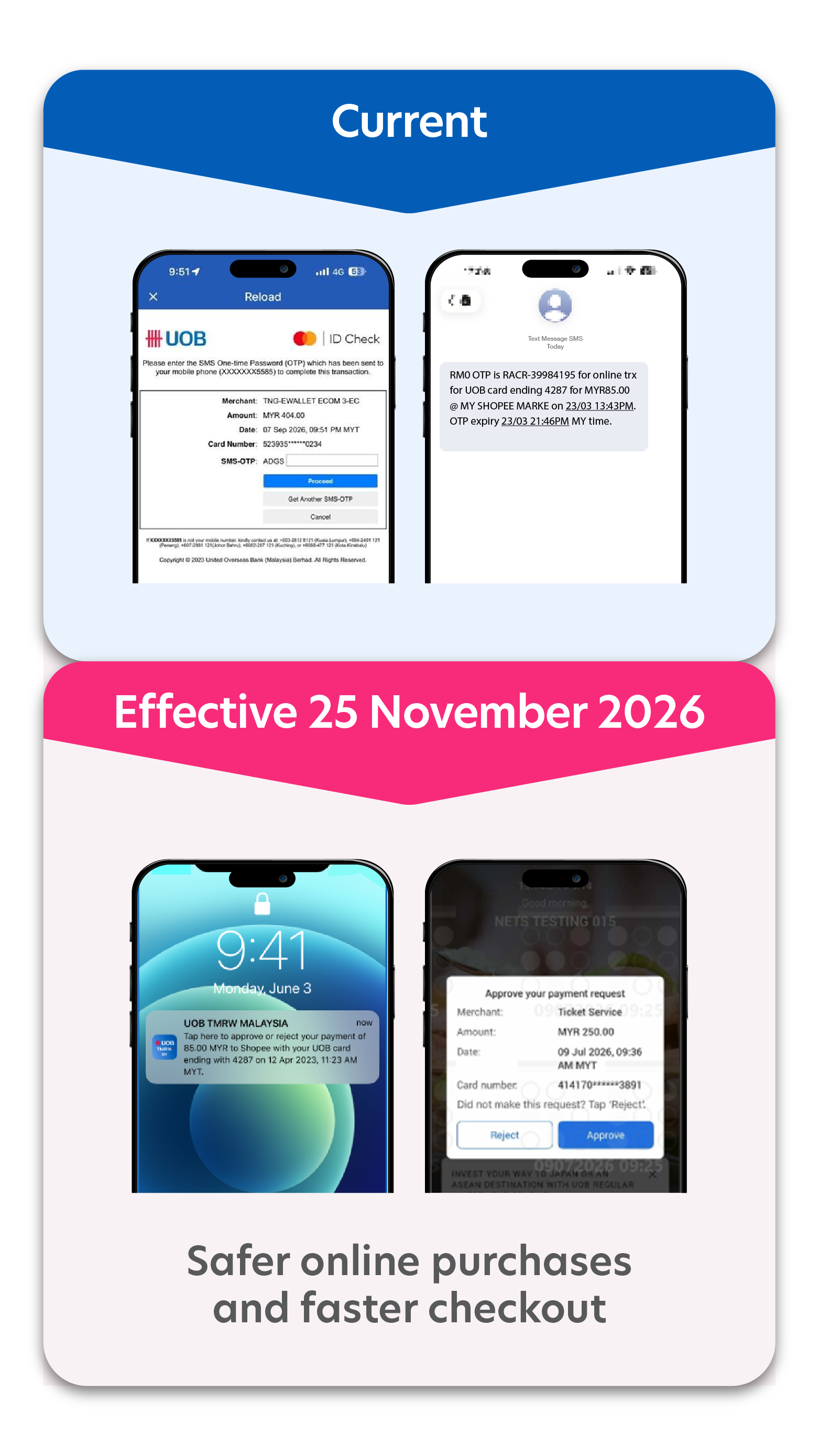
Online purchases made with your UOB Card will require Secure PIN authentication via UOB TMRW app effective by 25 November 2026*, replacing the existing SMS One-Time Password (OTP) authentication method.
[ 3d ]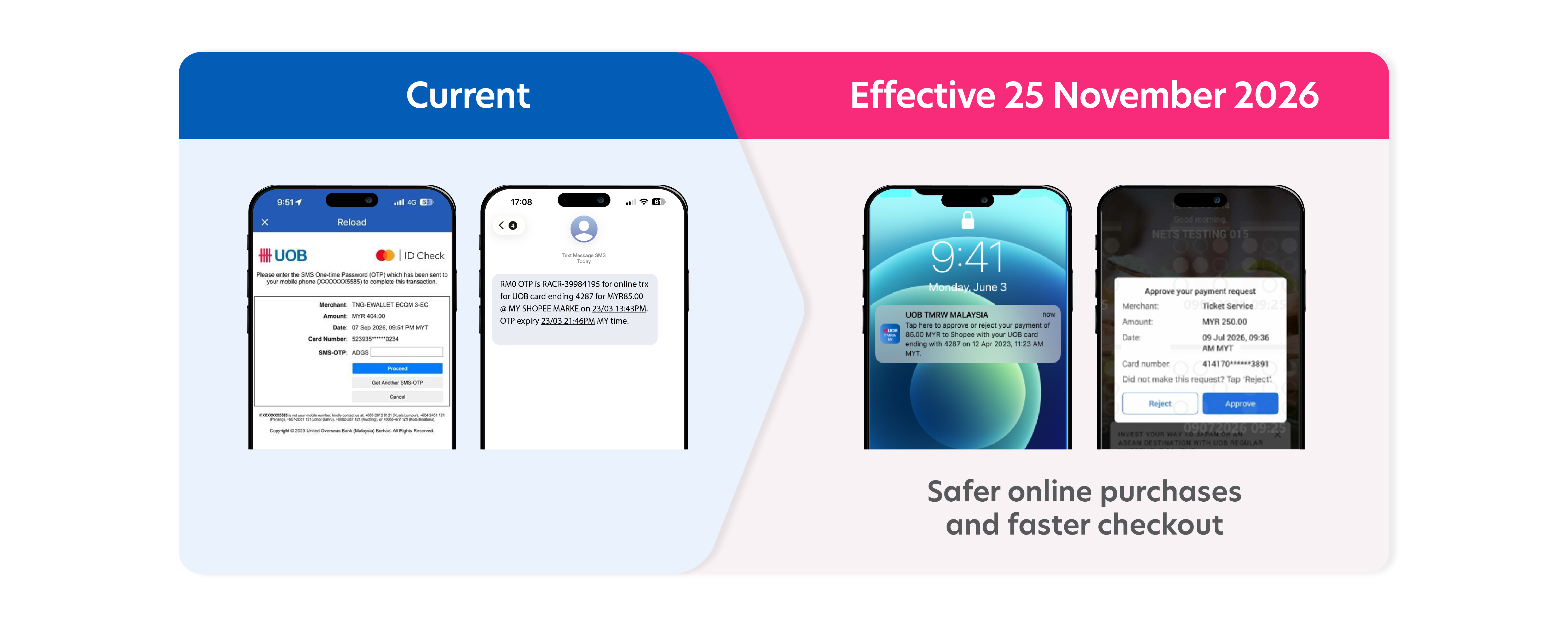
*Applicable to all UOB Credit and Debit Cards, except UOB Commercial Cards which will take effect on a later date.
Steps to approve online purchases on UOB TMRW app
Tip: Ensure your UOB TMRW app is up to date with push notifications enabled to avoid disruptions to your online purchases with UOB Cards.
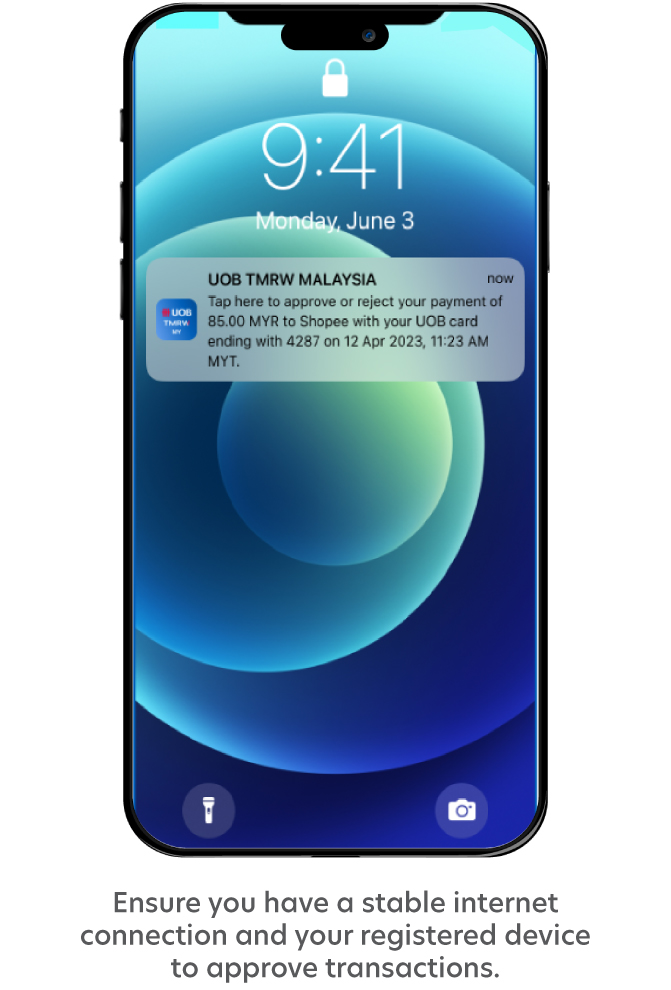
Step 1
Upon making an online purchase with your UOB Card, you will receive a push notification on your registered device. Tap to open it.
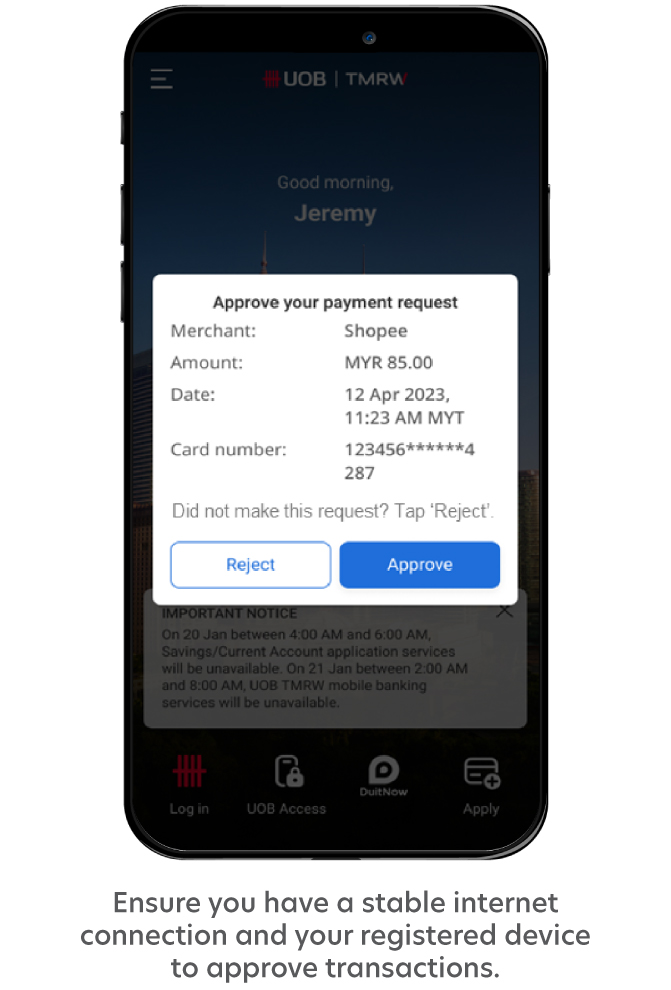
Step 2
Review the purchase details and tap "Approve" or "Reject". Follow the in-app instructions to proceed.
Step 3
Did not receive a push notification?
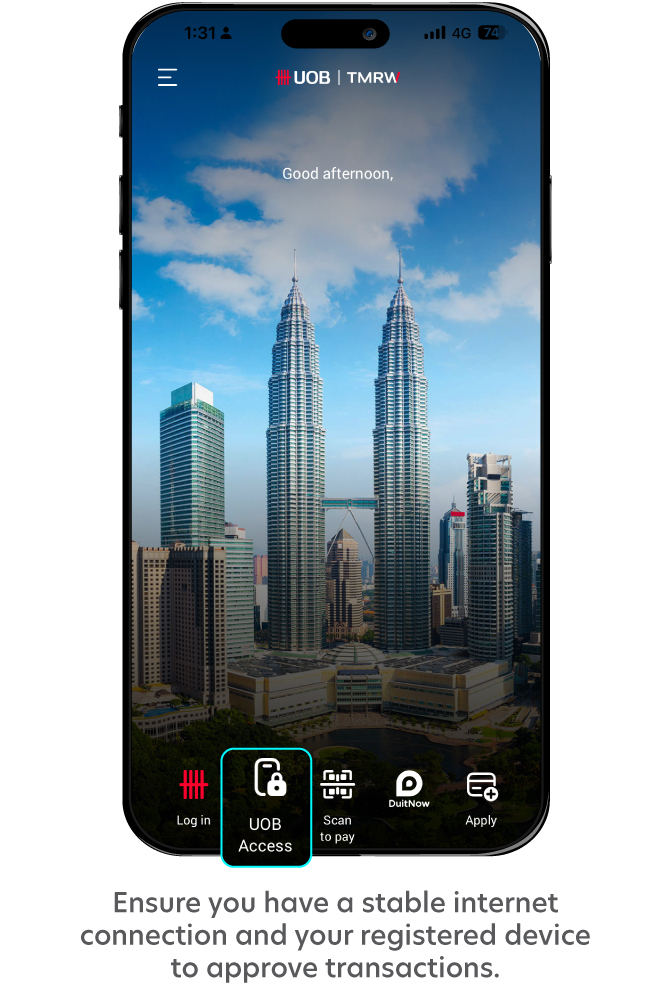
Open your UOB TMRW app and tap "UOB Access" on the login page to authenticate your online purchase.
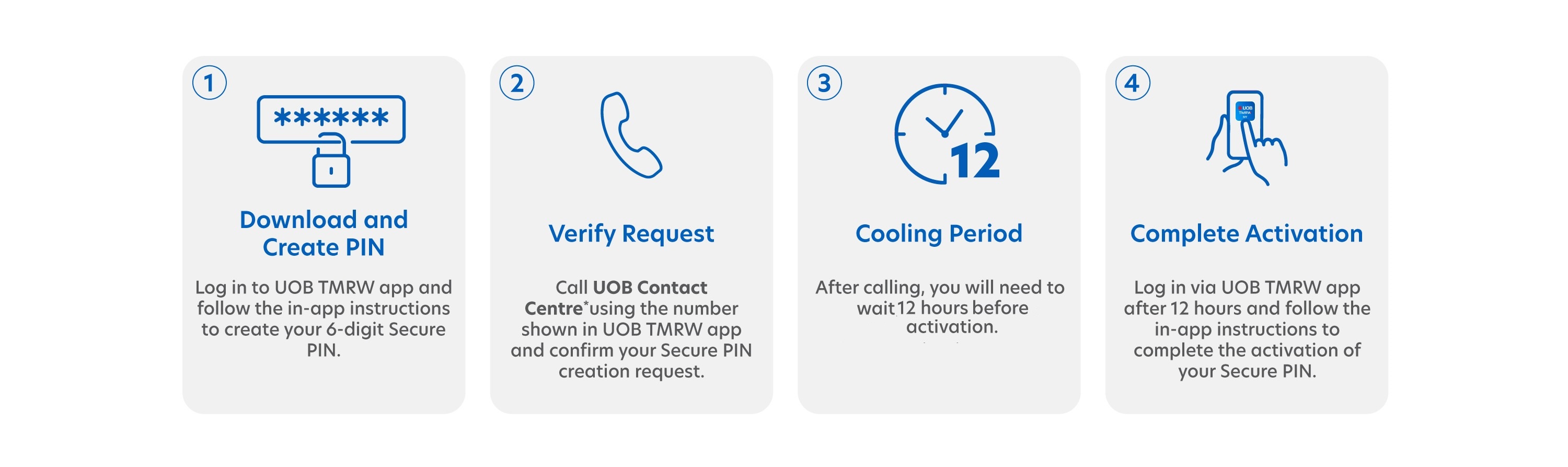
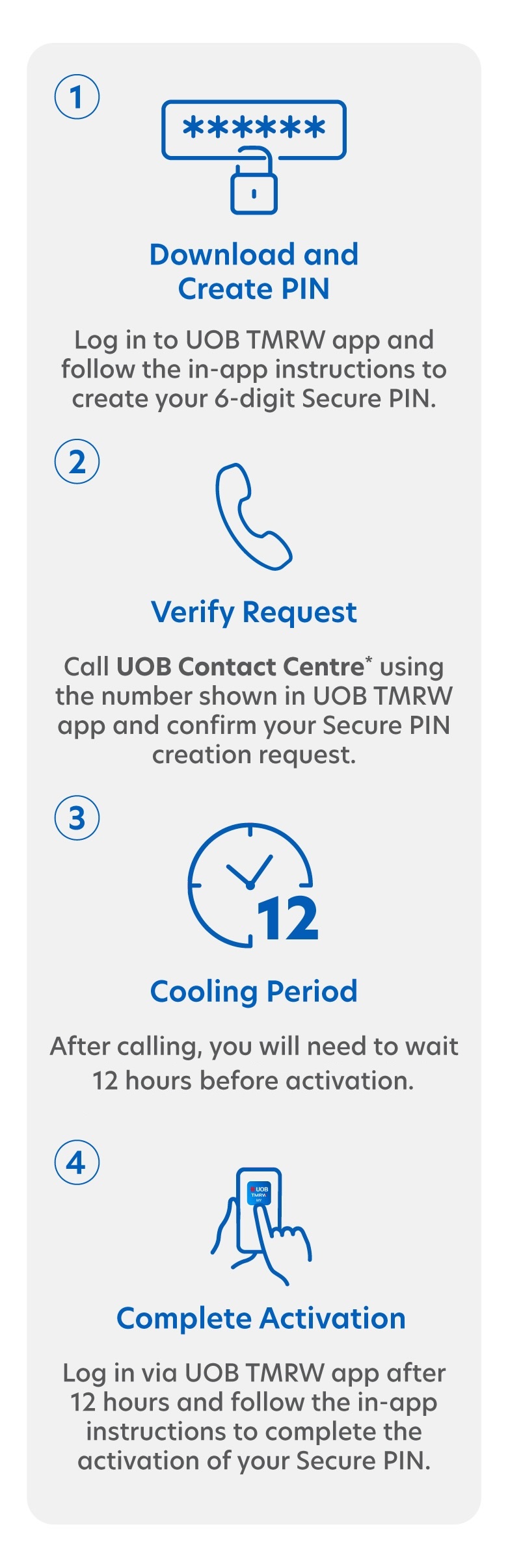
How to set up your Secure PIN
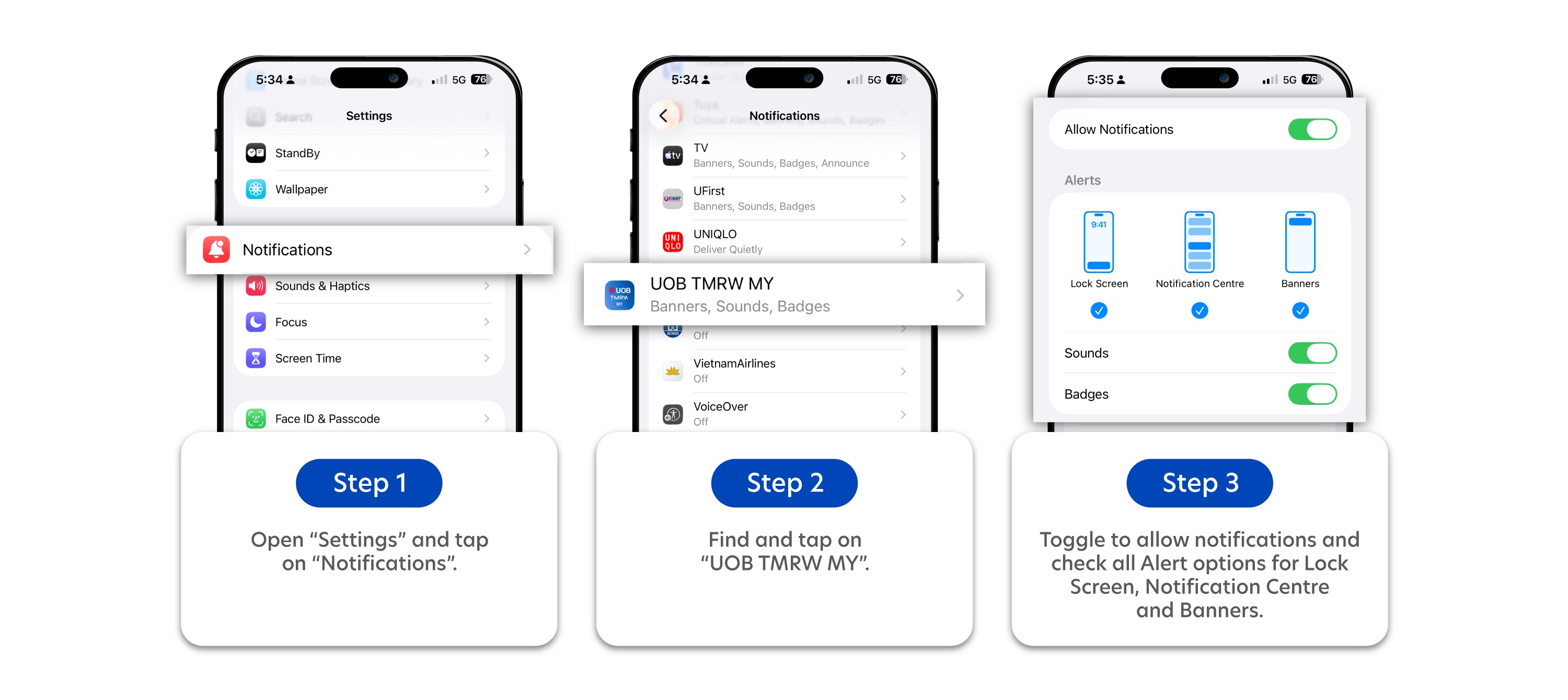
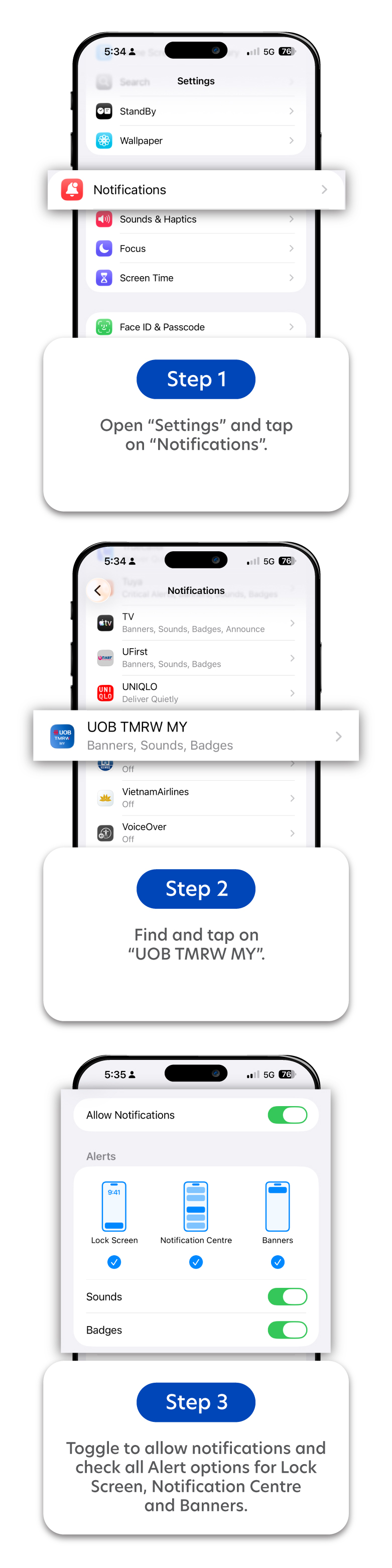
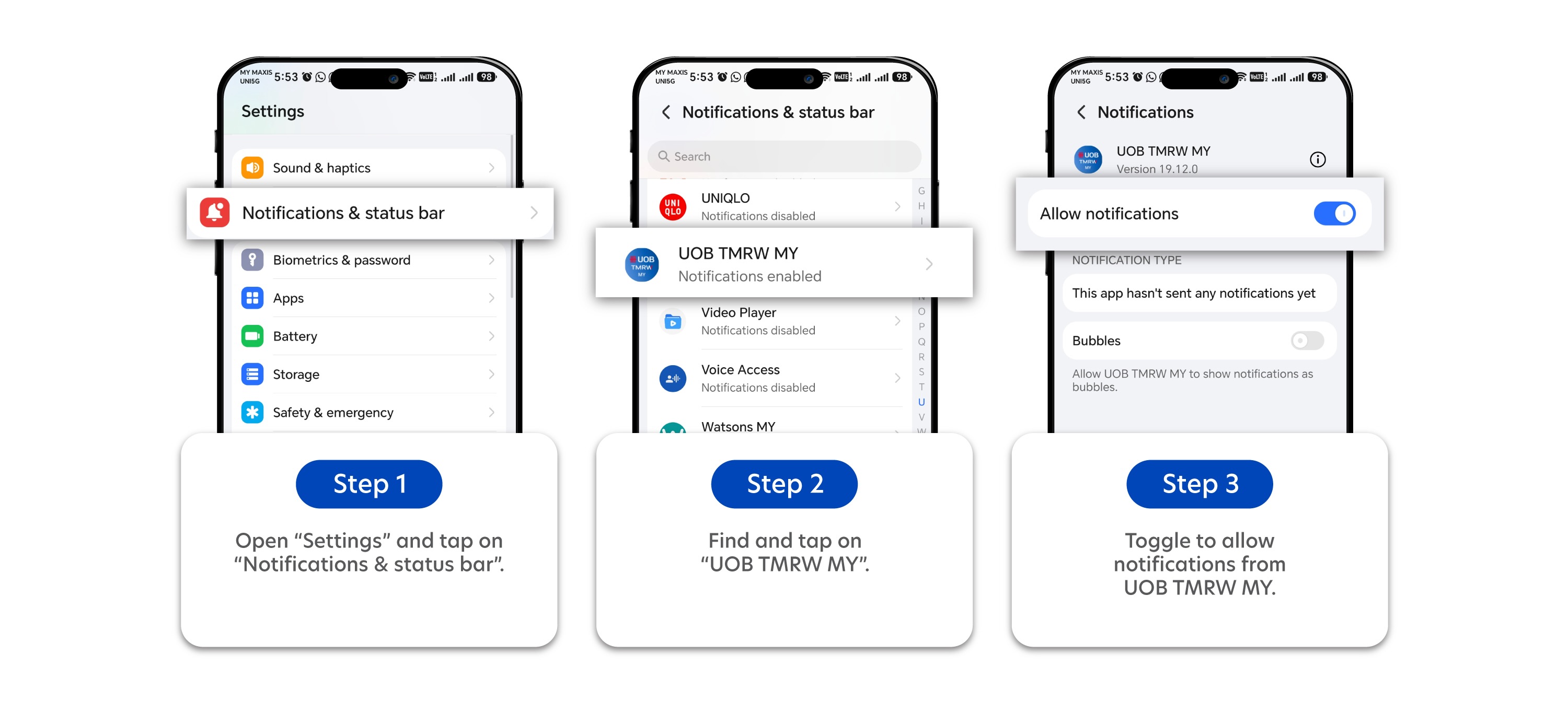
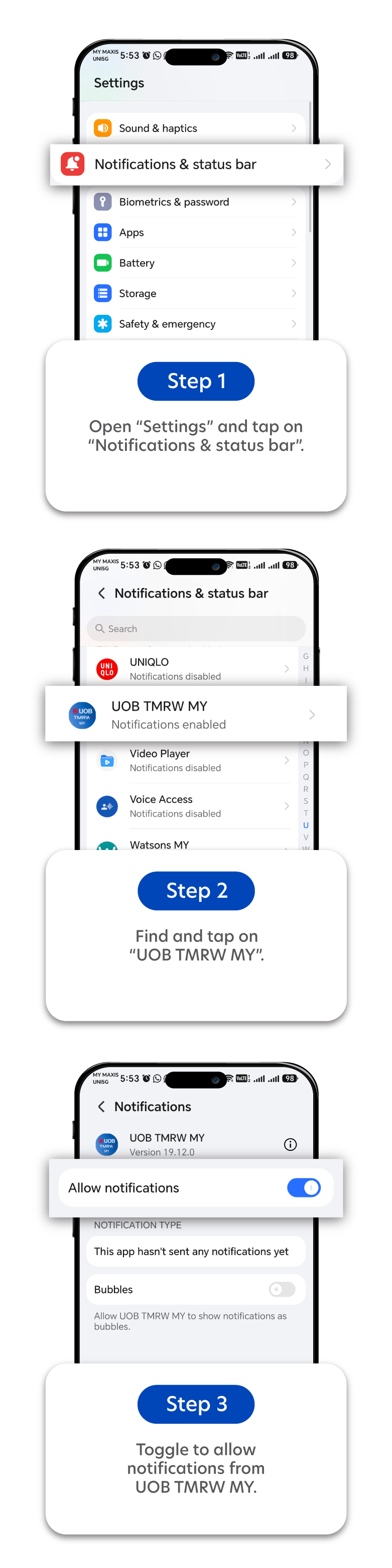
How to enable push notifications on UOB TMRW app
FAQ
About the migration
What is UOB Access?

UOB Access is a digital security token embedded in your smartphone to authorise your UOB Personal Internet Banking and UOB TMRW app transactions. When registering for UOB Access, you must set up a 6-digit Secure PIN in UOB TMRW app. The Secure PIN acts as your personal authentication code to verify online purchases.
Why is UOB replacing SMS One-Time Password (“OTP’) with Secure PIN authentication?
UOB is moving from SMS OTP to Secure PIN authentication to provide a more secure and convenient way to authenticate online purchases. Secure PIN authentication keeps the authentication process within the UOB TMRW app and reduces customers' exposure to SMS OTP fraud.
What are the benefits of using UOB Access?
UOB Access provides a convenient in-app authentication experience and adds an additional layer of security by linking authentication to your registered mobile device.
When will SMS OTP be replaced?
Secure PIN authentication will replace SMS OTP as the main authentication method for online purchases effective 25 November 2026 for all credit and debit cards except UOB Commercial Cards which will take effect on a later date.
What happens if I do not register for UOB Access?
You may not be able to complete online purchases above RM250 as per regulatory requirements.
Why am I not prompted for Secure PIN authentication for some online purchases?
Secure PIN authentication is only applicable to online purchases processed through 3D Secure (3DS). If the merchant does not support 3DS or the transaction is processed without 3DS authentication, you will not receive a Secure PIN authentication request. Such transactions may still be assessed and processed using the bank's security controls.
Is Secure PIN authentication required for all card transactions?
No. Secure PIN authentication is only used for 3D Secure (3DS) online transactions where additional cardholder verification is required. It does not apply to non-3DS transactions, card-present purchases, or ATM transactions.
Getting started
I am an existing UOB TMRW app user and have already set up my Secure PIN previously. Do I need to create a new Secure PIN?
No. If you are an existing UOB TMRW app user and have already set up your Secure PIN successfully in the past, you do not need to create a new Secure PIN. Your existing Secure PIN will remain valid and can be used as usual.
How do I know if I have already set up a Secure PIN?
Before logging in to UOB TMRW app, tap “UOB Access” next to the “Log in” button. You will be prompted to create a Secure PIN if you have not set it up before for your current device.
How do I register for UOB Access?
Download or launch UOB TMRW app, log in and follow the on-screen instructions to set up UOB Access and create your 6-digit Secure PIN. You will be required to call UOB Contact Centre using the number shown in UOB TMRW app and confirm your Secure PIN creation request.
Do I need the latest version of UOB TMRW app?
Yes, use the latest version of UOB TMRW app available from the official Apple App Store or Google Play Store.
What is Secure PIN?
Secure PIN is a personal 6-digit authentication code used to verify online transactions.
Can I use biometric authentication instead of my Secure PIN?
No, you are required to input your Secure PIN to authenticate transactions.
What is the cooling-off period?
The cooling-off period is a 12-hour security period between setting up UOB Access and completing activation. It is designed to help protect your account against unauthorised activation.
Why is there a cooling-off period?
The cooling-off period provides an additional security measure to reduce the risk of an unauthorised person activating Secure PIN authentication on a device.
What happens if I do not complete the Secure PIN setup?
If you do not call us to confirm your Secure PIN creation request within the 12-hour cooling-off period, your Secure PIN will not be activated and your access to UOB Personal Internet Banking and UOB TMRW app will be restricted. You will need to contact us to confirm the request and have your access reinstated.
Do I need to register for UOB Access and Secure PIN again if I change my mobile device?
Yes. To continue using UOB Access and Secure PIN on your new mobile device, download the UOB TMRW app and log in. Follow the on-screen instructions to set up Secure PIN. Once completed, UOB Access and Secure PIN on your old mobile device will be automatically deregistered.
How to authenticate
What will I see when a transaction requires Secure PIN authentication?
You will receive a push notification on your registered mobile device. When you open UOB TMRW app, the transaction details will appear for your review.
What information should I check before approving a transaction?
Check the transaction details shown in UOB TMRW app, including the transaction type, amount and recipient/payee details where displayed. Only approve the transaction if you initiated it and all details are correct.
Why should I check the transaction details before approving?
Checking the details helps you identify transactions you did not initiate or details that have been altered. If anything looks unfamiliar, do not approve the transaction and contact us immediately.
What happens after I approve the transaction?
After you approve the transaction on UOB TMRW app, return to the transaction screen and complete any remaining steps on the merchant’s page. The transaction will then be processed subject to our standard transaction checks.
What happens if I reject a transaction?
The transaction will be cancelled immediately and not processed.
What happens if I accidentally reject a transaction?
The transaction will be cancelled and you need to initiate the transaction again.
Can I approve the transaction later?
No, you will need to authenticate a transaction within 180 seconds from the transaction time. The transaction will be cancelled once the 180 seconds has lapsed.
How long is an authentication request valid for?
The authentication request is valid only for 180 seconds.
Push notification
Why didn't I receive the notification to authenticate a transaction?
This may be caused by poor network connectivity or notifications being disabled for UOB TMRW app on your device. Check your Notifications settings to enable it on your device and ensure you have a stable internet connection.
What should I do if I don't receive a push notification?
Check that: (1) you have the latest version of UOB TMRW app installed and logged in , (2) notifications for UOB TMRW app is enabled, (3) your device has a stable internet connection, and (4) you are using the device registered for UOB Access.
Can I still authenticate a transaction if push notifications are disabled
Yes. You can launch UOB TMRW app and tap on> UOB Access on the bottom of the screen to retrieve the transaction details.
Commercial Cards
My card is issued under a company name. Do I need to register for UOB Access and set up Secure PIN?
Yes. Although the card is issued under a company name, it is assigned to an individual cardmember. You are required to register for UOB Access and setup your Secure PIN to authenticate online purchases using the UOB Commercial Card assigned to you.
I am using a UOB Commercial Card that is under Corporate Liability. Does this change apply to me?
Yes. If your UOB Commercial Card is enabled for online purchases, you will need to have registered for UOB Access and your Secure PIN set up to authenticate transactions once SMS OTP has been replaced.
Can my company administrator approve transactions on my behalf?
No. For online purchases using the card assigned to you, authentication requests are sent directly to your registered mobile device and must be approved using your Secure PIN.
I have a personal UOB Card and a company-issued UOB Commercial Card. Do I need to register for UOB Access and set up Secure PIN separately for each card?
No. You only need to register for UOB Access and set up your Secure PIN once on your registered mobile device. Once activated, you can use your Secure PIN to authenticate online purchases made on both cards.
How will I know whether the authentication request is for my personal UOB Card or company-issued UOB Commercial Card?
Before approving a transaction, review the transaction details displayed in UOB TMRW app, including the merchant name, transaction amount and card details (where displayed), to confirm that the authentication request relates to the transaction you are performing.
I have both a personal UOB Card and a company-issued UOB Commercial Card. Can I use different mobile devices or mobile numbers for Secure PIN authentication?
No. Your personal UOB Card and company-issued UOB Commercial Card are linked to the same online banking profile. As each profile can only be associated with one registered mobile number and UOB Access can only be registered on one mobile device at a time for an authorised cardmember, you cannot maintain separate mobile numbers or mobile devices for Secure PIN authentication.
Will my company be able to view or approve transactions made using my personal UOB Card?
No. Your personal UOB Card and company-issued UOB Commercial Card accounts remain separate. UOB Access and Secure PIN is only used to authenticate online transactions and does not affect how your card accounts are managed, accessed or viewed.
I already have UOB Access registered and Secure PIN set up for my personal UOB Card. Do I need to take any additional action for my Commercial Card?
No. If you have already registered for UOB Access and set up your Secure PIN, you can continue using the same Secure PIN to authenticate online purchases for your UOB Commercial Card.
We have identified more than 1 employee to be an authorised Commercial Cardmembers. Can they use the same mobile number for UOB Access registration?
No. Each authorised UOB Commercial Cardmember must register for online banking using their own mobile number. As online banking access is set up individually for each cardmember, a shared mobile number should not be used for registration. UOB Access is subsequently registered on the cardmember's mobile device and can only be active on one mobile device at a time.

We use cookies in order to provide you with better services on our website. By continuing to browse the site, you agree to our privacy notice and cookie policy.